
Introduction
Launching an ecommerce website in Singapore involves more than choosing an attractive design and uploading products. A successful online store must provide a seamless shopping experience, process payments securely, attract visitors through search engines and support business operations.
For Singapore SMEs, there are also important considerations involving local payment methods, GST, data protection, logistics and customer expectations.
This Ecommerce Website Checklist Singapore guide covers 12 essential steps to help businesses plan, build and launch an effective online store.
Whether you are starting an ecommerce business or upgrading an existing website, this checklist will help you make informed decisions and avoid common mistakes.
For businesses still exploring their overall website requirements, TechWeb’s Business Website Checklist Singapore is a useful starting point.
1. Define Your Ecommerce Business Goals
Before beginning ecommerce website development, identify what your online store needs to achieve.
Different businesses have different requirements. A fashion retailer selling directly to consumers may need a simple product catalogue and checkout system. A wholesale supplier may require bulk ordering, customer-specific pricing and inventory integration.
Consider these questions:
- Who are your target customers?
- What products or services will you sell?
- Will you serve Singapore customers or international markets?
- How many products will you offer?
- Do you need wholesale or business-to-business functionality?
- What sales and growth targets do you have?
Clear objectives help determine the features, technology and budget required.
Checklist: Document your target audience, business goals and essential ecommerce functions.
2. Plan Your Ecommerce Website Structure
A well-organised website makes it easier for customers to find products and complete purchases.
Your ecommerce website should have clear navigation, logical product categories and useful information pages.
Essential ecommerce website pages
Most online stores should consider including:
- Homepage
- Product categories
- Individual product pages
- Shopping cart
- Secure checkout
- About Us
- Contact Us
- Shipping and delivery information
- Returns and refunds policy
- Privacy policy
- Terms and conditions, where appropriate
Organise products into categories that customers can understand easily.
For example, an electronics store might group products under computers, mobile accessories, networking equipment and storage devices.
Why website structure matters for SEO
Logical navigation also helps search engines discover and understand important pages.
According to Google’s SEO Starter Guide, a clear website structure and descriptive content help search engines interpret your pages.
Checklist: Prepare a website sitemap and organise products before development begins.
3. Ecommerce Website Development Singapore: Choose the Right Platform
Choosing the right ecommerce platform is an important long-term decision.
The platform affects how easily you can manage products, process payments, customise features and expand your online store.
Shopify vs WooCommerce Singapore
Two common platforms for SMEs are Shopify and WooCommerce.
| Feature | Shopify | WooCommerce |
|---|---|---|
| Platform | Hosted ecommerce solution | WordPress ecommerce plugin |
| Hosting | Managed by Shopify | Arranged separately |
| Customisation | Themes, apps and supported development tools | Extensive WordPress flexibility |
| Maintenance | Core platform managed | Requires website and hosting maintenance |
| Costs | Subscription and applicable additional charges | Hosting, extensions, development and maintenance |
| Suitable for | Businesses preferring a managed platform | Businesses requiring WordPress flexibility |
Shopify may be suitable for businesses seeking a managed ecommerce solution.
WooCommerce offers flexibility for businesses that require customised website functionality or integration with an existing WordPress environment.
Evaluate future requirements
Before choosing a platform, consider:
- Product catalogue size
- Payment gateway support
- Inventory integrations
- Delivery options
- Multilingual capabilities
- Customisation requirements
- Maintenance costs
- Future expansion
Checklist: Choose a platform based on business needs, scalability and total operating costs.
4. Ecommerce Website Cost Singapore: Plan Your Budget
Ecommerce website development costs depend on the project’s complexity and functionality.
A basic online store using a standard template will usually have different development costs from a customised ecommerce website with complex business integrations.
Key cost components
Website design and development
This includes page layouts, product templates, navigation and checkout functionality.
Domain and hosting
Depending on the platform, businesses may need hosting services, domain registration and SSL configuration.
Payment integration
Payment providers may charge transaction fees or other service fees.
Product catalogue setup
Preparing product images, descriptions, categories and variations requires time and resources.
Custom integrations
Connections to accounting software, CRM systems, inventory management and delivery services can increase development costs.
Website maintenance
Regular security updates, backups, monitoring and technical support should be included in long-term budgeting.
What should you look for in a quotation?
Ask your website developer to specify:
- Features included in the development price
- Product upload limits
- Payment gateway setup
- Mobile optimisation
- SEO configuration
- Training and handover
- Hosting and maintenance fees
- Additional development charges
Checklist: Compare the full scope of work rather than choosing solely on the lowest quotation.
5. Create Product Pages That Convert Visitors into Customers
Product pages influence purchasing decisions.
Customers should be able to understand the product, evaluate its suitability and complete a purchase without unnecessary complications.
Essential product page features
Descriptive product titles
Use clear titles that accurately describe the products.
High-quality images
Provide clear product photographs and relevant close-up views.
Useful product descriptions
Explain important specifications, features and benefits.
Accurate pricing
Display relevant prices and charges clearly.
Product availability
Provide accurate stock information where appropriate.
Clear purchasing options
Make product selection and add-to-cart buttons easy to find.
Optimise product descriptions for search engines
Avoid relying entirely on generic product descriptions supplied by manufacturers.
Original content can better address customer questions and distinguish your products from competing listings.
Relevant keywords should appear naturally in product titles, descriptions and headings.
TechWeb’s Content Creation Singapore page explains the importance of useful, search-friendly website content.
Checklist: Ensure product pages contain accurate information, useful images and clear purchasing options.
6. Mobile Ecommerce Website Design: Prioritise User Experience
An ecommerce website should work smoothly across smartphones, tablets and desktop computers.
Mobile-friendly design involves more than simply resizing a website to fit smaller screens.
Important mobile ecommerce features
Responsive design
Pages should adjust appropriately to different screen sizes.
Simple navigation
Customers should be able to browse categories and search for products easily.
Fast-loading pages
Optimised images, efficient code and suitable hosting can help reduce loading delays.
Easy checkout
Keep forms straightforward and avoid unnecessary steps.
Guest checkout
Allow customers to complete purchases without creating an account where appropriate.
Accessible buttons
Ensure purchasing buttons, menus and form controls are easy to use.
Test the entire shopping journey
A website may look attractive on mobile while still creating difficulties during checkout.
Test product selection, shopping cart functions, payment processing and order confirmations on actual mobile devices.
Checklist: Complete a full mobile purchase test before launching your online store.
7. Ecommerce Payment Gateway Singapore: Provide Convenient Payment Options
A reliable payment system is essential for any ecommerce website.
Singapore shoppers may prefer different payment methods depending on their purchasing habits and transaction values.
Common ecommerce payment methods
Depending on the provider and merchant eligibility, suitable options may include:
- Credit and debit cards
- PayNow
- Supported digital wallets
- Buy-now-pay-later options
- Bank transfers for selected business transactions
Payment providers such as Stripe and PayPal offer ecommerce payment services, although supported features and payment methods should be verified for your business.
What should you consider when choosing a gateway?
Evaluate:
- Transaction fees
- Supported payment methods
- Settlement periods
- Refund processing
- Security controls
- Fraud prevention
- Integration with your ecommerce platform
- International payment support
Secure payment processing
Use reputable payment providers and understand your responsibilities for payment data security.
A properly integrated payment service can reduce the amount of sensitive payment information handled directly by your website.
Checklist: Test successful payments, failed transactions, refunds and order confirmations before launch.
8. Singapore Ecommerce Requirements: Understand PDPA, GST and Consumer Protection
Ecommerce businesses operating in Singapore must consider applicable legal and regulatory requirements.
The specific obligations depend on the business model, products sold, customer locations and registration status.
Business registration
Businesses carrying out commercial activities may need to register with the Accounting and Corporate Regulatory Authority (ACRA), subject to applicable exemptions.
ACRA provides guidance on business registration requirements and eligibility, including online ventures.
Personal Data Protection Act (PDPA)
Online stores commonly collect customer information such as names, contact details, delivery addresses and purchase histories.
Singapore’s Personal Data Protection Act establishes requirements concerning the collection, use, disclosure and protection of personal data.
Businesses should review:
- Personal data collection and use
- Privacy notices
- Consent and other permitted grounds for processing
- Data protection safeguards
- Retention and disposal practices
- Third-party service arrangements
- Data breach response procedures
Organisations must also designate a Data Protection Officer and make relevant business contact information publicly available.
Refer to the Personal Data Protection Commission’s Data Protection Obligations for official guidance.
GST requirements for ecommerce websites
Singapore’s prevailing GST rate is 9%.
GST-registered businesses generally must display GST-inclusive prices when advertising or quoting prices to the public, subject to applicable exceptions.
Businesses that are not GST-registered should not charge GST.
For detailed requirements, refer to IRAS guidance on displaying and quoting prices.
Consumer protection
The Consumer Protection (Fair Trading) Act addresses unfair practices in consumer transactions.
Online businesses should ensure that product descriptions, prices and promotional statements are accurate.
Clear delivery arrangements, return conditions and customer policies can also help reduce misunderstandings.
The Competition and Consumer Commission of Singapore’s Guidelines on Price Transparency provide useful guidance for retailers.
Checklist: Review business registration, personal data protection, taxation and consumer protection requirements before accepting customer orders.
9. Set Up Shipping, Fulfilment and Inventory Management
An ecommerce transaction does not end when a customer completes payment.
Businesses must deliver products accurately and within the communicated timeframe.
Establish delivery options
Depending on your business model, delivery arrangements may include:
- Standard local delivery
- Express delivery
- Free shipping above a minimum order value
- Self-collection
- International shipping
Shipping charges and estimated delivery periods should be communicated clearly.
Integrate logistics where appropriate
Ecommerce platforms may support integrations for:
- Shipping label generation
- Delivery tracking
- Order notifications
- Courier booking
- Shipping rate calculations
Improve inventory accuracy
An inventory management system can help businesses track stock levels and avoid selling unavailable products.
Businesses operating both physical and online stores may benefit from synchronising inventory across their sales channels.
Checklist: Confirm that order processing, stock management, delivery and return procedures are ready before launch.
10. Ecommerce SEO Singapore: Improve Search Visibility
An ecommerce website needs visitors before it can generate sales.
Search engine optimisation helps search engines discover and understand your product pages, categories and supporting content.
Important ecommerce SEO practices
Keyword research
Identify the search terms customers use when looking for your products.
Product page optimisation
Use descriptive page titles, meaningful headings and useful product content.
Category page SEO
Create informative category pages that help visitors understand the available products.
Internal linking
Connect relevant products, categories and educational articles.
Image optimisation
Use appropriate image formats, descriptive alt text and optimised image sizes.
Technical SEO
Check indexing, canonical URLs, redirects and XML sitemaps.
Structured data
Where applicable, implement structured data to help search engines understand product information.
Google’s Product Structured Data documentation explains how eligible product pages may appear with additional information in search results.
Enhanced search appearances are not guaranteed.
Build SEO into the website from the beginning
SEO should be part of the development process rather than something added only after launch.
Read TechWeb’s SEO-Ready Website Development Singapore guide for more information on planning a search-friendly website.
Checklist: Ensure important product pages are accessible to search engines and have appropriate metadata, content and internal links.
11. AI Ecommerce Solutions Singapore: Improve Customer Service and Automation
Artificial intelligence offers opportunities for ecommerce businesses to improve customer interactions and automate selected activities.
However, AI should be introduced where it solves a practical business problem.
AI chatbots for ecommerce websites
An AI-powered chatbot can help customers:
- Find relevant products
- Understand product specifications
- Ask about delivery arrangements
- Obtain answers to common questions
- Locate return and refund information
- Contact customer service when needed
For example, an online electronics store could use an AI assistant to help customers compare compatible accessories based on verified product information.
TechWeb explores these applications in its article on AI Chatbot Singapore.
AI product recommendations
AI-assisted recommendation systems may suggest related products based on available product data and relevant customer interactions.
These systems can help customers discover suitable options when implemented appropriately.
Ecommerce workflow automation
Businesses can explore automation for:
- Customer enquiry routing
- Order status enquiries
- Product information assistance
- Customer feedback analysis
- Repetitive administrative tasks
Not every process requires AI. Simple rules-based automation may be more reliable and cost-effective for certain tasks.
Responsible AI implementation
Customer-facing AI systems should use accurate product information and include appropriate controls.
Businesses should also consider data protection, customer privacy and human oversight.
Read TechWeb’s AI for Business Websites article for additional guidance on preparing business websites for AI integration.
Checklist: Identify practical AI opportunities that can improve customer experience or operational efficiency.
12. Test, Launch and Maintain Your Ecommerce Website
Before launching an ecommerce website, test its essential functions carefully.
Pre-launch testing checklist
Website navigation
Ensure menus, categories and links work correctly.
Product information
Check product names, descriptions, prices and availability.
Shopping cart
Confirm customers can add, update and remove products.
Payment processing
Test payment success, failure and refund workflows.
Mobile performance
Complete purchases using different devices and screen sizes.
Security
Review HTTPS, access controls, software updates and backups.
Search engine readiness
Check indexing settings, metadata and sitemaps.
Analytics
Configure suitable website analytics and ecommerce tracking.
Monitor ecommerce performance
After launch, review important metrics such as:
| Metric | Purpose |
|---|---|
| Website traffic | Measures visitor activity |
| Conversion rate | Tracks visits resulting in purchases |
| Average order value | Measures average revenue per order |
| Cart abandonment | Highlights incomplete purchases |
| Revenue by channel | Identifies effective acquisition channels |
| Returning customers | Helps evaluate customer retention |
These metrics can help identify opportunities to improve the website.
Maintain website performance and security
An ecommerce website requires ongoing attention to remain reliable.
Depending on the platform, maintenance may include updates, security monitoring, backups, performance optimisation and integration testing.
TechWeb’s Website Maintenance Singapore services provide ongoing website support.
Checklist: Complete launch testing, configure analytics and establish a maintenance plan.
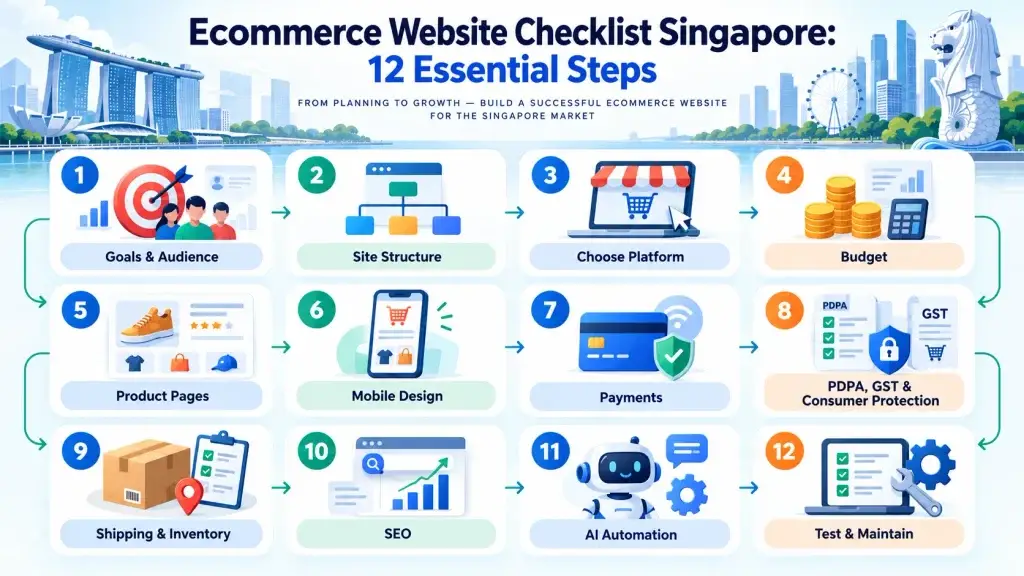
Final Ecommerce Website Checklist for Singapore SMEs
Before launching your ecommerce website, confirm that you have completed the following:
- Defined business objectives and target customers.
- Organised product categories and website navigation.
- Selected a suitable ecommerce development platform.
- Established development and maintenance budgets.
- Created accurate product pages and descriptions.
- Optimised the website for mobile devices.
- Integrated and tested payment gateways.
- Reviewed applicable Singapore regulatory requirements.
- Established shipping and inventory processes.
- Implemented essential ecommerce SEO practices.
- Evaluated suitable AI and automation opportunities.
- Completed website testing and maintenance planning.
Completing these steps provides a stronger foundation for a reliable online store.
Frequently Asked Questions About Ecommerce Websites in Singapore
1. How much does an ecommerce website cost in Singapore?
The cost depends on the ecommerce platform, website design, number of products, payment integrations and custom features.
Businesses should request a detailed quotation covering development, hosting, subscriptions, maintenance and other ongoing costs.
2. Which ecommerce platform is best for Singapore SMEs?
Shopify and WooCommerce are both established choices.
Shopify offers a managed ecommerce environment while WooCommerce provides extensive WordPress customisation options.
The best platform depends on your budget, business operations and future requirements.
3. How can I improve ecommerce SEO in Singapore?
Focus on relevant keywords, descriptive product pages, clear navigation, technical SEO and useful content.
Internal links between product categories and supporting articles can also improve website discoverability.
SEO performance should be monitored and improved over time.
4. Do ecommerce websites in Singapore need a Privacy Policy?
Businesses collecting personal data should provide appropriate information about how that data is handled and comply with applicable PDPA obligations.
A privacy notice should accurately reflect the organisation’s activities rather than relying on a generic template.
5. Can AI improve ecommerce sales?
AI may support product discovery, customer enquiries and recommendations.
However, increased sales are not guaranteed. Results depend on implementation, product information, customer needs and the overall shopping experience.
6. What should I check before launching an online store?
Check website navigation, product accuracy, mobile usability, payment processing, shipping arrangements, security, legal compliance and search engine readiness.
Complete several end-to-end test purchases before opening the store to customers.
Conclusion: Build an Ecommerce Website That Supports Business Growth
Launching an ecommerce website in Singapore requires careful planning across design, technology, payments, SEO and business operations.
A successful online store should make shopping convenient, protect customer information and provide a reliable purchasing experience.
Following this Ecommerce Website Checklist Singapore guide will help businesses identify essential requirements before investing in ecommerce development.
Modern ecommerce websites can also benefit from AI-powered customer assistance and practical automation, provided these features are implemented responsibly.
By combining clear website planning, sound technical foundations and ongoing optimisation, businesses can create an ecommerce platform that supports sustainable growth.
Ready to Build or Improve Your Ecommerce Website?
TechWeb helps Singapore businesses develop professional, SEO-ready websites designed to support their digital objectives.
Whether you are launching an online store, improving an existing ecommerce website or exploring AI-powered features, we can help you plan a suitable approach.
Contact TechWeb to Discuss Your Ecommerce Website Project
Build an ecommerce website that works for your customers and supports your business growth.